Our mission: empower every team to create, manage, localize, and publish engaging product and solution content that accelerates understanding, adoption, and business growth.
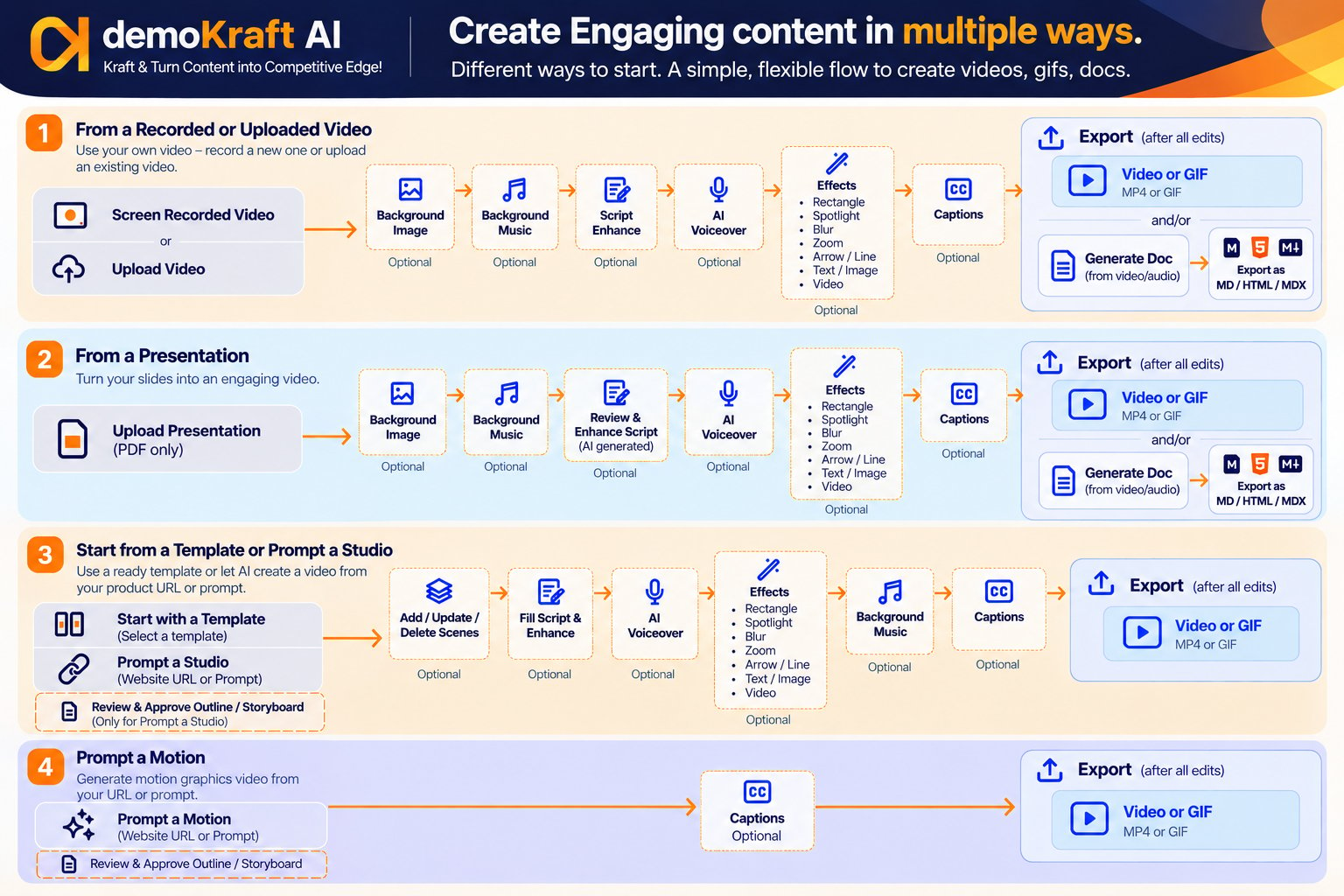
The different ways to create content with Demokraft AI Studio
What you can create
Use Studio for the content your team needs every day:Launch & explainer videos
Launch, explainer, and intro videos for new products and features.
Walkthrough & how-to videos
Step-by-step product walkthroughs and how-to videos.
Customer education & support
Videos that help customers learn your product and solve problems on their own.
Training videos
Onboarding and training content for customers, partners, and teams.
Help docs & how-to guides
Multi-format help docs and step-by-step guides generated from your videos.
Animated GIFs
Short, looping GIFs for docs, emails, and social posts.
Ways to create a video
Choose the starting point that fits your content. Every option opens in the same Studio editor, where you can polish the result.Record your screen
Capture a raw screen recording with the Demokraft AI Chrome extension.
Upload a screen recording
Upload a recording you already have and turn it into a polished video.
Convert a presentation
Upload a slide deck and turn it into a narrated video.
Start from a template
Build from ready-made video templates and motion graphics components, or start from a blank template.
Prompt a Studio
Generate a fully editable Studio video from your product website URL or a product description.
Prompt a Motion
Quickly create a professional, brand-aligned motion graphics video from a website URL or product description.
Polish and enhance your video
After you create a project, refine it in the Studio editor. AI helps at every step, and nothing changes without your approval. Each capability has its own guide. Select a card to learn more.Script and voice
Script editing & AI enhancement
Add, edit, or delete script lines yourself, or let AI tighten and polish them.
AI voiceover
Replace raw narration with a natural AI voice that stays in sync with your video.
Captions
Add captions in a range of styles.
Pronunciation & vocabulary
Make sure product names and terms are always spelled and pronounced correctly.
Visual effects and branding
Zoom, spotlight & blur
Draw attention to key areas, or hide sensitive information.
Rectangles, arrows & lines
Highlight actions and guide the viewer’s eye.
Animated text
Add titles, stats, and calls to action with animated entrances and exits.
Image & video elements
Place logos, screenshots, or video clips over your video.
Background image
Frame your video with a branded background.
Background music
Set the mood with a music track that’s balanced against your voiceover.
Device mockups
Show your product inside animated laptops, desktops, frames, and glass panels.
Intro, outro & chapter scenes
Open, close, and divide your video with branded scenes.
Presets
Save your preferred polish settings and apply them to any video in one click.
Scene editing
Add, update & delete scenes
Add new video or image scenes, update them, or remove ones you don’t need.
Trim & split scenes
Shorten scenes or split them in two, and keep your script in sync.
Localize and publish
Multilingual recording
Record or upload videos narrated in 35+ languages.
Translation
Translate both audio and on-screen text into up to 40 languages.
Generate docs
Turn your video into a help doc in any of the 40 supported languages, as Markdown, HTML, or MDX.
Export video & GIF
Download your video as an MP4 (up to 4K) or an animated GIF.
Make your content work for you
Demokraft AI does more than create content. Publish your Studio content to Demokraft AI Hub to share it with prospects and customers and see how they engage with it.Get started
Set up your account and create your first Studio project.
Need help?
Contact our support team at support@demokraft.ai.